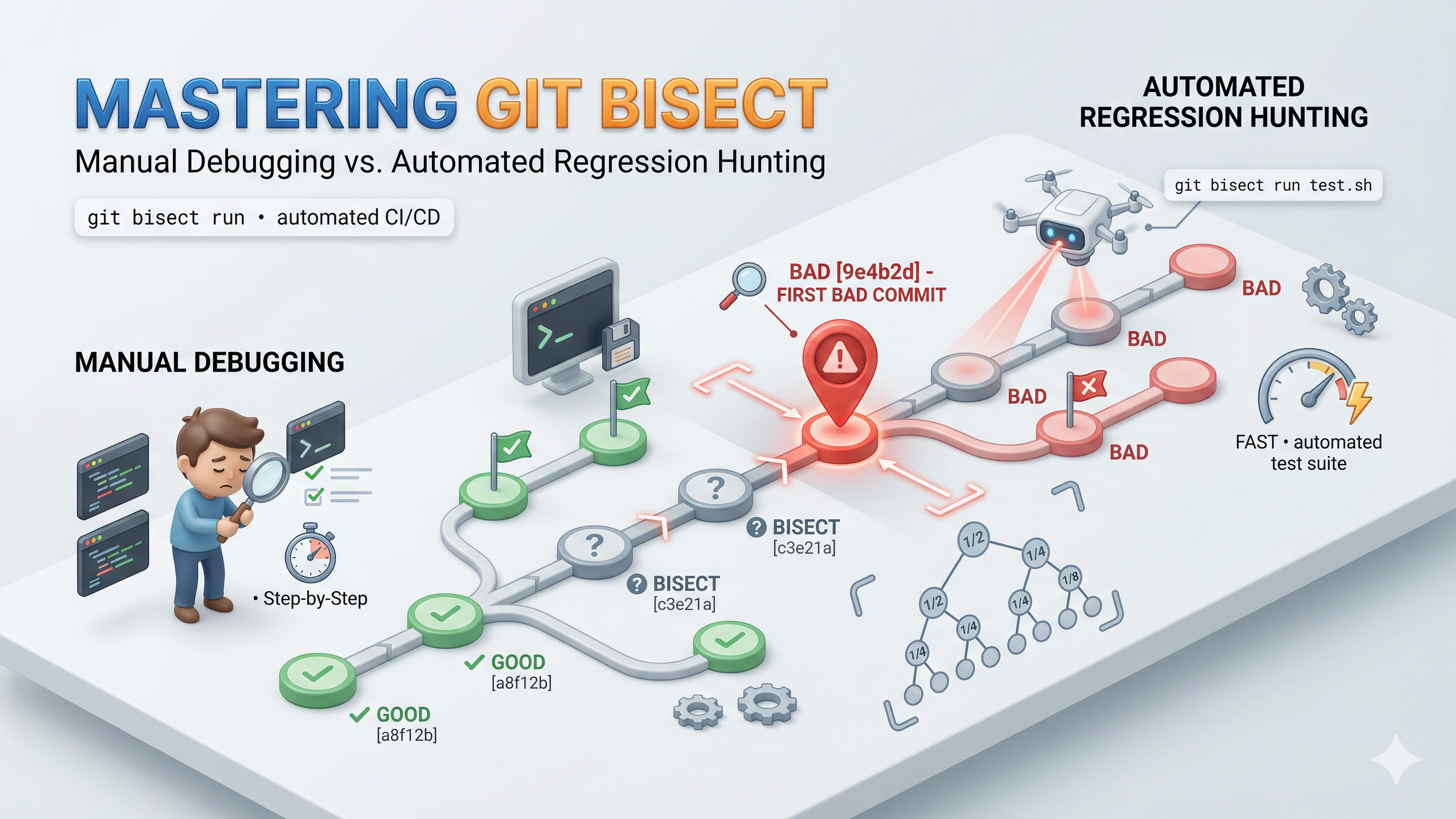
The Dreaded Regression: A Developer's Nightmare
Every developer has faced it: a perfectly working feature suddenly breaks, or performance mysteriously degrades. You know it was fine 'yesterday' but something in 'today's' codebase introduced a regression. The challenge isn't just fixing the bug, but finding when it was introduced and by whom. Sifting through hundreds, or even thousands, of commits manually is a soul-crushing task that wastes valuable engineering time. This is where git bisect, a powerful Git command, transforms from a niche tool into an indispensable workflow superpower. But how do you wield its full potential? Is manual inspection always necessary, or can automation take the reins?
In this post, we'll dive deep into two primary ways of leveraging git bisect: the hands-on manual approach and the streamlined automated method. We'll break down their operational complexities, evaluate their pros and cons, and provide a clear decision framework to help you choose the right strategy for your regression hunting.
Approach 1: Manual Git Bisect – The Basics of Binary Search
At its core, git bisect performs a binary search through your commit history to find the exact commit that introduced a bug. You tell Git a 'bad' commit (where the bug exists) and a 'good' commit (where it didn't), and Git narrows down the range by checking commits in the middle.
How it Works (Manual Steps):
- Start the bisect session:
git bisect start - Mark a known bad commit: This is typically your
HEADor any commit where the bug is reproducible.git bisect bad <bad_commit_hash_or_ref> - Mark a known good commit: This is an older commit where you're certain the bug didn't exist.
git bisect good <good_commit_hash_or_ref> - Iterate and test: Git will checkout a commit in the middle. You then manually test if the bug is present.
- If the bug is present:
git bisect bad - If the bug is NOT present:
git bisect good
- If the bug is present:
- The reveal: Repeat step 4 until Git identifies the first bad commit.
<commit_hash> is the first bad commit - End the session: Don't forget to reset your repository to its original state.
git bisect reset
Pros of Manual Bisect:
- No setup overhead: Requires no scripting or test automation.
- Flexibility for complex bugs: Ideal when the bug requires complex manual steps to reproduce, or if automated tests don't exist for the specific regression.
- Human intuition: Allows developers to inspect the code at each step, gaining deeper context.
Cons of Manual Bisect:
- Time-consuming: Each step requires human intervention, compilation (if applicable), and testing.
- Error-prone: A single incorrect 'good' or 'bad' judgment can derail the entire process.
- Context switching: Repeatedly building and testing breaks flow and reduces productivity.
When to Choose Manual Bisect:
Use manualgit bisectwhen you're dealing with a regression that is difficult to automate, requires intricate manual steps to reproduce, or when your codebase lacks a comprehensive automated test suite. It's also a good starting point for quickly understanding the capabilities ofgit bisect.
Approach 2: Automated Git Bisect with a Simple Test Script
The true power of git bisect shines when you pair it with automation. Instead of manually testing each commit, you provide git bisect with a script that can automatically determine if a commit is 'good' or 'bad'.
How it Works (Automated with git bisect run):
The core idea is to create an executable script that:
- Can compile your project (if necessary).
- Runs a specific test (or set of tests) that targets the regression.
- Exits with a status code:
0(zero) if the commit is 'good' (test passes, bug not present).1to127(non-zero, except 125) if the commit is 'bad' (test fails, bug present).125if the commit should be skipped (e.g., it can't be built, or the test is irrelevant).
#!/bin/bash
# test_regression.sh

# 1. Build the project (if needed)
make || exit 125 # Skip if build fails

# 2. Run the specific test that catches the regression
# Replace 'your_test_command_here' with actual test
your_test_command_here

# 3. Check the exit status of your test
if [ $? -eq 0 ]; then
  exit 0 # Test passed, commit is GOOD
else
  exit 1 # Test failed, commit is BAD
fi
Once you have this script, you run git bisect as follows:
git bisect start
git bisect bad <bad_commit_hash_or_ref>
git bisect good <good_commit_hash_or_ref>
git bisect run ./test_regression.sh
Pros of Automated Bisect:
- Speed: Significantly faster, especially for long histories.
- Accuracy: Eliminates human error in judging 'good' or 'bad'.
- Hands-off: Can run in the background while you focus on other tasks.
- Reproducibility: The script provides a clear, repeatable test.
Cons of Automated Bisect:
- Scripting overhead: Requires initial effort to write a reliable test script.
- Test fragility: The script itself must be robust and not prone to false positives/negatives.
- Environment dependencies: The script needs to handle build processes and environmental setup consistently across commits.
When to Choose Automated Bisect:
Automated git bisect is the preferred choice when the regression can be reliably identified by an automated test (unit, integration, or even a simple performance check). It's incredibly efficient for projects with good test coverage or when dealing with frequently occurring, reproducible bugs.Approach 3: Advanced Automated Bisect with Complex Setups
For large-scale applications, your test script might need to do more than just run a unit test. It might involve spinning up services, migrating databases, or deploying to a temporary environment. While the principle of git bisect run remains the same, the complexity of the script increases.
Challenges and Solutions:
- Build Environment Variability: Older commits might require different build tools or dependencies. Using containerization (e.g., Docker) can standardize the build environment.
- Database Migrations: If your project uses a database, the script might need to apply migrations for each checkout. This can be slow and complex to manage. Consider using in-memory databases or ephemeral containers.
- Long Test Suites: Running a full integration or end-to-end test suite for every commit can be extremely slow. Prioritize creating a minimal test that targets the regression specifically for bisecting.
Architectural Considerations for Complex Setups:
For highly complex projects, think of your bisect script as a mini-CI/CD pipeline. It needs to:
- Checkout the code.
- Build it in an isolated environment (e.g., Docker container).
- Provision any necessary external services (databases, message queues).
- Run targeted tests.
- Clean up.
This approach leverages the robustness of your CI/CD setup but shrinks it down for local, targeted regression hunting. The decision to invest in such a complex bisect script should be weighed against the frequency and cost of such regressions.
Architectural Decision Framework: Choosing Your Bisect Strategy
The choice between manual and automated git bisect isn't about one being inherently 'better', but rather about aligning the tool with the problem at hand and your project's context.
- Regression Reproducibility:
- Highly repeatable, measurable: Lean towards automated.
- Intermittent, complex manual steps: Manual might be faster initially.
- Test Coverage:
- Comprehensive unit/integration tests: Automated is a no-brainer.
- Minimal or no automated tests: Manual is your primary option, or invest in a minimal regression test script for future bisects.
- Time Sensitivity:
- Urgent fix needed: If a quick, dirty manual check can pinpoint it faster than writing a script, go manual. Otherwise, automated bisect saves hours.
- Project Size & Complexity:
- Small, simple project: Manual bisect is often sufficient.
- Large, microservices, complex build: Invest in robust automated scripts, potentially using containerization, to avoid future manual toil.
- Developer Skill & Comfort:
- If you have shell scripting gurus, automated bisect is easier to implement. If not, manual bisect reduces the barrier to entry.
Production Lessons & Trade-offs
- Non-Deterministic Tests: If your automated test script occasionally fails on a 'good' commit,
git bisectwill misidentify the bad commit. Ensure your tests are deterministic. - "Broken" Commits: Sometimes, a commit might fail to build or run tests not because of the bug, but due to unrelated issues (e.g., temporary dependency breakage). Use
git bisect skipor ensure your script returns125in such cases. - Performance Regressions: Bisecting performance often requires a script that runs a benchmark and compares against a threshold. This makes automation even more critical.
- The Importance of Good Commit Hygiene: Frequent, small, atomic commits with clear messages make bisecting a breeze. Large, sprawling commits make it harder to pinpoint the exact change.
- Not always the "Root Cause":
git bisectfinds the commit where the observable behavior changed. The true root cause might be an earlier, subtle change that only manifested later. However, knowing the first observable change is an invaluable starting point.
Key Takeaways
git bisectis an essential tool for efficiently finding regression-introducing commits by performing a binary search on your commit history.- Manual Bisect is flexible and requires no setup, making it ideal for complex, hard-to-automate bugs or projects without extensive test coverage. However, it is slow and prone to human error.
- Automated Bisect, driven by
git bisect run <script>, is significantly faster and more accurate for regressions identifiable by automated tests. It requires an initial investment in scripting but pays off immensely. - For very complex projects, a robust automated bisect script might resemble a mini-CI/CD pipeline, involving containerization and targeted testing.
- Choose your bisect strategy based on regression reproducibility, test coverage, time constraints, and project complexity.
- Always ensure your test scripts are deterministic, handle build failures gracefully, and strive for good commit hygiene to simplify future bisecting efforts.
Be the first to leave a comment.
Leave a comment