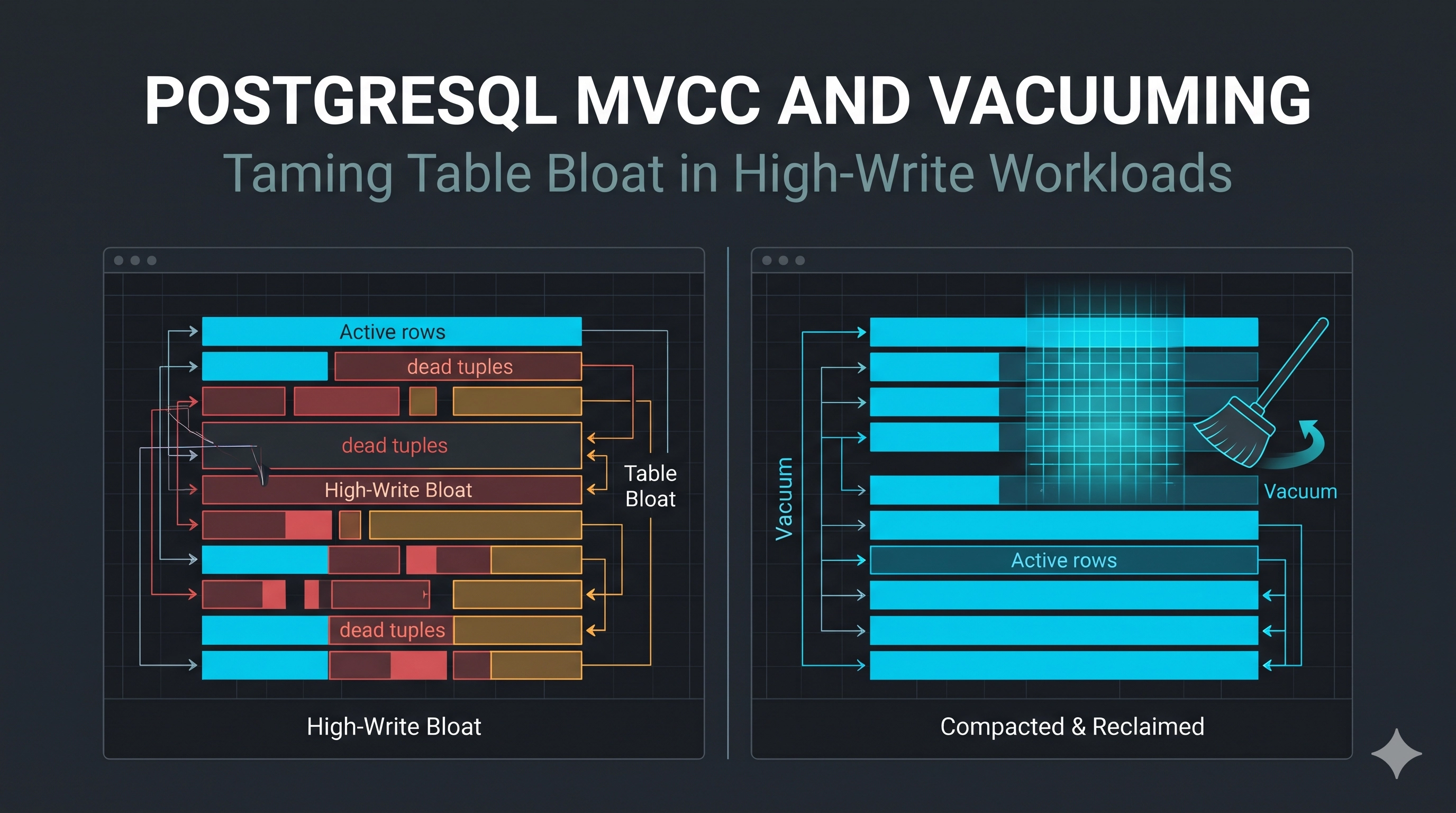
The Invisible Burden: When Your PostgreSQL Database Starts Swelling
Imagine this scenario: your application is scaling, user engagement is high, and your PostgreSQL database is handling a massive influx of writes. Everything seems fine, then gradually, subtly, performance starts to degrade. Queries that were once snappy become sluggish. Disk usage climbs faster than expected. You check your indexes, your query plans, and your server resources – all appear normal, yet the database feels… heavy. This isn't always a simple indexing problem or a misconfigured connection pool. Often, the culprit is PostgreSQL table bloat, a silent killer of performance in write-heavy systems.
Table bloat is a byproduct of PostgreSQL's ingenious Multi-Version Concurrency Control (MVCC) mechanism. While MVCC ensures transactional consistency and non-blocking reads, it comes with a maintenance cost: old data isn't immediately deleted. Left unchecked, this accumulation of "dead tuples" can drastically impact query performance, increase storage costs, and even lead to system instability. Let's dive into this production pitfall and uncover how to keep your PostgreSQL lean and mean.
The MVCC Conundrum: Why PostgreSQL Needs Regular Cleaning
At its core, MVCC allows multiple transactions to access the same data without blocking each other. When a row is UPDATEd or DELETEd in PostgreSQL, the old version isn't immediately removed. Instead, a new version of the row is created (for UPDATEs), or the existing row is simply marked as "dead" (for DELETEs), effectively becoming invisible to new transactions. The original data, now a "dead tuple," remains on disk until it's explicitly reclaimed.
-- Example: A simple UPDATE creates a new row version
UPDATE products SET price = 105.00 WHERE id = 123;

-- Example: A DELETE marks the row as dead
DELETE FROM orders WHERE status = 'cancelled' AND created_at < NOW() - INTERVAL '1 year';
This mechanism is brilliant for concurrency, but it means that tables and their associated indexes accumulate these dead tuples over time. As the number of dead tuples grows, the physical size of your tables and indexes expands without holding more live data. This phenomenon is called bloat. When queries run, they still have to scan through these dead tuples, consuming unnecessary disk I/O and memory, which ultimately slows down your database.
Peering into the Bloat: Identifying the Culprit
So, how do you know if bloat is affecting your system? PostgreSQL provides excellent introspection tools. The pg_stat_user_tables view is your first stop:
SELECT
    relname AS table_name,
    pg_size_pretty(pg_relation_size(relid)) AS current_size,
    n_live_tuples AS live_rows,
    n_dead_tuples AS dead_rows,
    round(n_dead_tuples * 100.0 / (n_live_tuples + n_dead_tuples), 2) AS dead_percentage,
    last_autovacuum,
    last_autoanalyze
FROM pg_stat_user_tables
WHERE n_live_tuples > 0 -- Only consider tables with actual data
ORDER BY dead_percentage DESC
LIMIT 10;
High dead_percentage values (e.g., above 20-30% for active tables) are a strong indicator of bloat. You might also notice a significant difference between pg_relation_size(table_name) and the actual size of live data, which you can estimate by running:
SELECT
    pg_size_pretty(sum(pg_column_size(t.*))) AS actual_data_size,
    pg_size_pretty(pg_relation_size('your_table')) AS relation_size
FROM your_table t;
If relation_size is much larger than actual_data_size, you're experiencing bloat. Keep in mind that indexes can also become bloated, especially on columns that are frequently updated, requiring similar analysis and maintenance.
The Janitor: Understanding Vacuuming
The process of cleaning up dead tuples and reclaiming space is called vacuuming. There are a few variants:
VACUUM(Standard): This command marks the space occupied by dead tuples as available for reuse by new data within the same table file. It does NOT shrink the physical file size on disk. It's crucial for preventing transaction ID wraparound and keeping indexes healthy.VACUUM FULL: This command rewrites the entire table and its indexes, reclaiming all free space and shrinking the physical file size. However, it requires an exclusive lock on the table, blocking all reads and writes during its execution. This is a severe production pitfall, making it generally unsuitable for active tables.VACUUM FREEZE: This is a variant ofVACUUMthat sets the freeze age for tuples, preventing transaction ID wraparound issues that could lead to data corruption. Modern PostgreSQL versions handle this automatically viaautovacuum.
-- Standard vacuum, reclaims space internally, doesn't shrink file
VACUUM your_table;

-- DANGER: Blocks reads/writes, rewrites entire table and shrinks file
VACUUM FULL your_table;
Autovacuum: The Unsung Hero (and Its Limitations)
Thankfully, PostgreSQL has an autovacuum daemon that runs in the background, automatically performing VACUUM and ANALYZE operations. It's usually enabled by default and is your primary defense against bloat.
However, default autovacuum settings might not be aggressive enough for tables with extremely high write rates or very specific access patterns. This can lead to creeping bloat over time. Key parameters to consider tuning (globally or per-table):
autovacuum_vacuum_scale_factor: The fraction of the table size that must change to trigger aVACUUM. Default is 0.2 (20%). For very large, active tables, you might want to lower this (e.g., 0.05 or 0.1) to trigger vacuums more frequently.autovacuum_vacuum_threshold: The minimum number of dead tuples required to trigger aVACUUM. Default is 50. This is added to the scale factor calculation.autovacuum_analyze_scale_factorandautovacuum_analyze_threshold: Similar parameters for triggeringANALYZE, which updates table statistics for the query planner.autovacuum_max_workers,autovacuum_vacuum_cost_limit,autovacuum_vacuum_cost_delay: Control the resourcesautovacuumuses. Be cautious when adjusting these globally.
Production Fix: Tuning Autovacuum for Specific Tables
-- Example: Make autovacuum more aggressive for a critical, high-write table
ALTER TABLE sales_transactions SET (
    autovacuum_vacuum_scale_factor = 0.05, -- Trigger at 5% changes
    autovacuum_vacuum_threshold = 500,     -- Minimum 500 dead tuples
    autovacuum_analyze_scale_factor = 0.02, -- Analyze at 2% changes
    autovacuum_analyze_threshold = 200
);

-- To reset to global defaults
ALTER TABLE sales_transactions RESET (
    autovacuum_vacuum_scale_factor,
    autovacuum_vacuum_threshold,
    autovacuum_analyze_scale_factor,
    autovacuum_analyze_threshold
);
Monitoring pg_stat_user_tables after these changes will tell you if your adjustments are effective.
Advanced Strategies for Persistent Bloat
Even with aggressive autovacuum tuning, some scenarios might still lead to persistent bloat, especially for indexes or tables with specific hot spots.
pg_repack: This external tool (not built-in) can perform an onlineVACUUM FULLequivalent without exclusive locks. It works by creating a new table in the background, applying changes, and then swapping them. It's an excellent option for de-bloating heavily used tables and indexes.REINDEX CONCURRENTLY: For bloated indexes, this command allows rebuilding an index without taking a long-lasting exclusive lock. It takes aSHARE UPDATE EXCLUSIVElock, which allows concurrent reads and writes, but blocksALTER TABLE. It's much safer than a plainREINDEX.
-- Example: Rebuilding a bloated index concurrently
REINDEX INDEX CONCURRENTLY my_index_on_table;
- Partitioning: For very large tables where data ages out (e.g., time-series data or logs), table partitioning can be a game-changer. You can quickly drop old partitions, effectively deleting vast amounts of data without causing bloat in the main table or needing extensive vacuuming.
FILLFACTOR: This storage parameter defines how full a table or index page can be. A lowerFILLFACTORleaves more free space, which can be beneficial for tables with frequentUPDATEs, as new versions of rows can be placed on the same page, reducing the need for new page allocations and thus mitigating bloat. However, it also means less data per page, potentially increasing disk I/O for reads. Use with caution after careful testing.
-- Example: Set FILLFACTOR for a table
ALTER TABLE high_update_table SET (FILLFACTOR = 70);
Production Lessons and Trade-Offs
- Monitor Relentlessly: Don't wait for performance to degrade. Regularly check
pg_stat_user_tablesand disk usage. Set up alerts for tables with high dead tuple percentages. - Autovacuum is Your Friend, but Not Perfect: Trust
autovacuum, but understand its limitations. Tune it aggressively for critical, high-write tables. VACUUM FULLis a Last Resort: AvoidVACUUM FULLon production systems unless you can tolerate significant downtime. Usepg_repackorREINDEX CONCURRENTLYinstead.- Bloat Affects Indexes Too: Don't just look at table bloat; index bloat can be equally detrimental to query performance.
- Consider Architecture: For extremely high-write scenarios, especially with frequent updates to the same rows, consider if a different data model or even a different database technology (like a time-series database for time-series data) might be more appropriate.
Understanding and actively managing PostgreSQL bloat is a critical skill for any senior engineer dealing with high-performance database systems. Ignoring it is like letting your house fill up with junk – eventually, you won't be able to move.
Key Takeaways
- PostgreSQL MVCC creates "dead tuples" on
UPDATEandDELETEoperations, leading to table and index bloat. - Bloat degrades query performance by increasing disk I/O and making indexes inefficient.
- Use
pg_stat_user_tablesto identify bloated tables and indexes. autovacuumis essential, but often needs per-table tuning for high-write workloads.- Avoid
VACUUM FULLin production; use tools likepg_repackorREINDEX CONCURRENTLYfor online de-bloating. - Partitioning and careful use of
FILLFACTORcan help mitigate bloat in specific scenarios.
Be the first to leave a comment.
Leave a comment