Introduction: The Imperative of Offline-First
In an increasingly connected world, the irony is that network connectivity remains unpredictable. From a patchy Wi-Fi connection in a coffee shop to a slow mobile network on a commute, users frequently encounter scenarios where their internet access is unreliable or entirely absent. This reality poses a significant challenge for web applications, often leading to frustrating loading spinners, error messages, and a poor user experience. Enter Service Workers – the unsung heroes of modern web development, enabling capabilities like push notifications, background synchronization, and, most crucially, robust offline experiences.
While the concept of "offline-first" might conjure images of complex data synchronization, its foundation lies in strategic asset caching. Simply slapping a basic "cache-first" strategy onto everything isn't enough. Different types of content demand different caching behaviors. Static application shell assets (HTML, CSS, JS, images) might thrive with aggressive caching, but dynamic data (like a list of articles or user-specific content) requires a more nuanced approach to balance freshness with availability. This guide will walk you through implementing several pragmatic Service Worker caching strategies, helping you build truly resilient web applications.
Registering Your Service Worker
Before diving into caching strategies, ensure your Service Worker is properly registered. This typically happens in your main application JavaScript file.
// main.js
if ('serviceWorker' in navigator) {
  window.addEventListener('load', () => {
    navigator.serviceWorker.register('/service-worker.js')
      .then(registration => {
        console.log('Service Worker registered successfully:', registration);
      })
      .catch(error => {
        console.error('Service Worker registration failed:', error);
      });
  });
}
Now, let's create our service-worker.js file.
Core Caching Strategies in Action
All caching logic resides within the Service Worker's fetch event listener. This event intercepts all network requests made by the page controlled by the Service Worker, allowing us to decide whether to serve from cache, network, or a combination.
1. Cache-First, Network Fallback (for App Shell & Static Assets)
This is ideal for static assets that don't change often, like your HTML, CSS, JavaScript bundles, and images. The Service Worker first tries to fetch the resource from the cache. If found, it serves it immediately. If not, it falls back to the network, and upon successful retrieval, caches it for future use.
// service-worker.js
const CACHE_NAME = 'dratini-tech-v1';
const urlsToCache = [
  '/',
  '/index.html',
  '/styles.css',
  '/app.js',
  '/images/logo.png'
];

self.addEventListener('install', (event) => {
  event.waitUntil(
    caches.open(CACHE_NAME)
      .then((cache) => {
        console.log('Opened cache');
        return cache.addAll(urlsToCache);
      })
  );
});

self.addEventListener('fetch', (event) => {
  // Only apply to specific URLs or types if needed,
  // here we'll demonstrate a general approach
  event.respondWith(
    caches.match(event.request)
      .then((response) => {
        // Cache hit - return response
        if (response) {
          return response;
        }
        // No cache hit - fetch from network
        return fetch(event.request).then((networkResponse) => {
          // Check if we received a valid response
          if (!networkResponse || networkResponse.status !== 200 || networkResponse.type !== 'basic') {
            return networkResponse;
          }
          // IMPORTANT: Clone the response. A response is a stream
          // and can only be consumed once. We must clone it so that
          // we can consume the stream twice: one for the browser and one for the cache.
          const responseToCache = networkResponse.clone();
          caches.open(CACHE_NAME).then((cache) => {
            cache.put(event.request, responseToCache);
          });
          return networkResponse;
        });
      })
  );
});
2. Network-First, Cache Fallback (for Fresh Content)
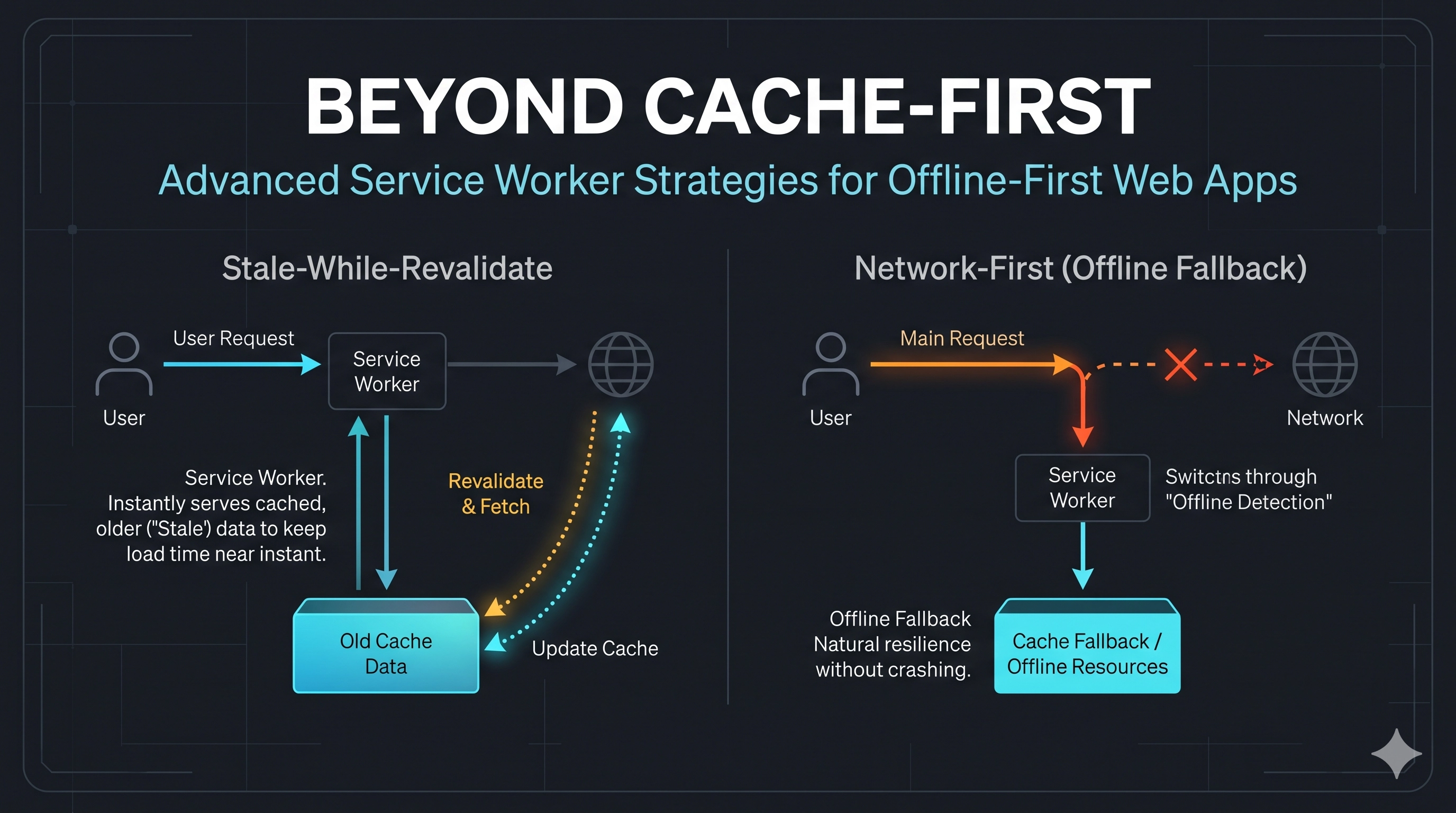
For content that needs to be as fresh as possible, but where an offline version is still desirable as a last resort (e.g., user-specific data, frequently updated lists). The Service Worker first attempts to fetch from the network. If successful, it serves the network response and updates the cache. If the network request fails (e.g., offline), it falls back to the cached version.
// service-worker.js (within fetch listener, for specific routes)
// Example: Dynamic API calls for blog posts
if (event.request.url.startsWith('https://api.dratini.tech/posts')) {
  event.respondWith(
    fetch(event.request)
      .then((networkResponse) => {
        // If network request is successful, cache and return
        if (networkResponse.status === 200) {
          const responseToCache = networkResponse.clone();
          caches.open(CACHE_NAME).then((cache) => {
            cache.put(event.request, responseToCache);
          });
        }
        return networkResponse;
      })
      .catch(() => {
        // Network failed, try to serve from cache
        return caches.match(event.request);
      })
  );
  return; // Important: ensure other fetch handlers don't process this request
}
3. Stale-While-Revalidate (for Frequently Updated Content)
This strategy is excellent for content that can be slightly out of date, but you want it updated eventually (e.g., a list of articles on a blog). The Service Worker immediately serves the cached version (if available) to provide instant feedback, while simultaneously making a network request in the background. Once the network request completes, it updates the cache with the fresh data for the next visit. This provides a great balance between speed and freshness.
// service-worker.js (within fetch listener, for specific routes)
// Example: Blog post content
if (event.request.url.startsWith('https://api.dratini.tech/article/')) {
event.respondWith(
caches.match(event.request).then((cachedResponse) => {
const networkFetch = fetch(event.request).then((networkResponse) => {
// Check if we received a valid response
if (!networkResponse || networkResponse.status !== 200 || networkResponse.type !== 'basic') {
return networkResponse;
}
// Update the cache with the new network response
const responseToCache = networkResponse.clone();
caches.open(CACHE_NAME).then((cache) => {
cache.put(event.request, responseToCache);
});
return networkResponse;
}).catch(() => {
// Network failed, and no cache available for some reason
// You might want to return an offline placeholder or re-throw
return new Response('Offline
Content not available offline.
', {
headers: { 'Content-Type': 'text/html' }
});
});
// If a cached response is available, return it immediately
// otherwise, wait for the network fetch
return cachedResponse || networkFetch;
})
);
return;
}Notice the clever use of cachedResponse || networkFetch; which ensures an immediate cache hit if possible, otherwise falls back to waiting for the network.
Production Considerations and Best Practices
- Cache Versioning and Invalidation: For
CACHE_NAME, incrementing the version (e.g.,dratini-tech-v2) is a common way to signal to the Service Worker that it needs to re-fetch allurlsToCacheduring itsinstallevent. For dynamic caches, consider usingCache-Controlheaders and theupdatemethod. - Managing Old Caches: During activation, clean up old caches to prevent stale content and save storage space.
// service-worker.js (add to the activate listener)
self.addEventListener('activate', (event) => {
  event.waitUntil(
    caches.keys().then((cacheNames) => {
      return Promise.all(
        cacheNames.map((cacheName) => {
          if (cacheName !== CACHE_NAME && cacheName.startsWith('dratini-tech-')) {
            console.log('Deleting old cache:', cacheName);
            return caches.delete(cacheName);
          }
          return Promise.resolve();
        })
      );
    })
  );
});- Error Handling and Fallbacks: Always consider what happens if both network and cache fail. Providing a graceful offline page or a simple error message enhances user experience.
- Debugging: The browser's developer tools (Application -> Service Workers) are invaluable for inspecting Service Worker status, clearing caches, and debugging
fetchevents. - Scope and Updates: Understand the Service Worker's scope. It only controls pages within its directory or subdirectories. Ensure proper update flow (
skipWaiting()duringinstallandclients.claim()duringactivatecan force immediate updates, but use with caution).
Key Takeaways
- Service Workers are essential for building resilient, offline-first web applications.
- No single caching strategy fits all content; tailor strategies (cache-first, network-first, stale-while-revalidate) to the type and criticality of the resource.
installandfetchevents are the primary hooks for managing caching logic.- Proper cache versioning, cleanup, and error handling are crucial for production readiness.
- Use browser developer tools extensively for debugging and testing your Service Worker.
Be the first to leave a comment.
Leave a comment