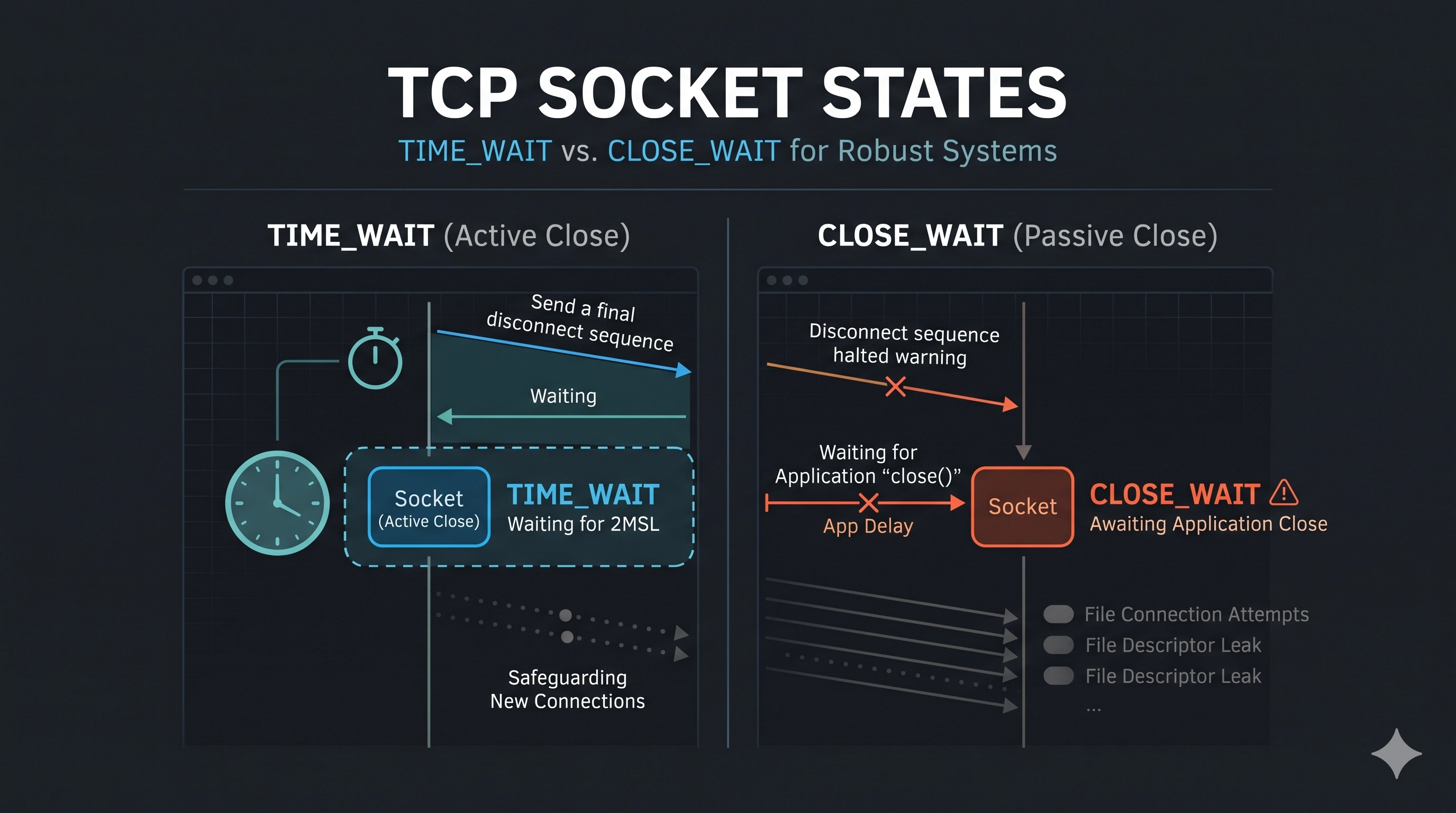
The Unseen Bottlenecks of TCP
In the world of distributed systems and high-performance applications, network connectivity is paramount. Yet, even seasoned engineers can be blindsided by cryptic errors like "Address already in use" or inexplicable connection drops. Often, the culprits are two TCP socket states that, while essential for network reliability, can become silent killers of performance and stability if misunderstood: TIME_WAIT and CLOSE_WAIT.
While both states signify a connection in the process of closing, their origins, implications, and mitigation strategies are fundamentally different. Failing to distinguish between them can lead to misdiagnoses, wasted time, and persistent operational headaches. This post will delve deep into these two states, providing an architectural comparison and a practical guide to identifying and resolving the issues they represent.
Understanding TCP Connection Termination
Before we dive into TIME_WAIT and CLOSE_WAIT, let's briefly recap how a TCP connection is gracefully terminated. It's a four-way handshake:
- The client (or whoever initiates the close) sends a
FINsegment, indicating it has no more data to send. - The server acknowledges the
FINwith anACK. At this point, the server can still send data. - Once the server has finished sending its data, it also sends a
FIN. - The client acknowledges the server's
FINwith anACK.
This is where TIME_WAIT and CLOSE_WAIT come into play.
The TIME_WAIT State: The Client's Guardian
The TIME_WAIT state is entered by the endpoint that performs the active close – typically the client, or whichever side initiates the first FIN. It's a safety mechanism, often referred to as the "2MSL wait" (twice the Maximum Segment Lifetime).
Why it exists:
- Reliable Connection Termination: Ensures that the final
ACKsent by the active closer is received by the passive closer. If theACKis lost, the passive closer will retransmit itsFIN, and the active closer inTIME_WAITcan resend theACK. - Preventing "Orphan" Connections: Prevents delayed packets from an old incarnation of a connection from being misinterpreted as part of a new connection that happens to use the same local port, remote port, and IP addresses.
Problems caused by TIME_WAIT:
Each TIME_WAIT socket consumes a local port number for the duration of its timeout (usually 60 seconds). On systems that initiate a very high number of short-lived connections (e.g., HTTP proxies, load balancers, or microservices making many outbound calls), this can lead to:
- Port Exhaustion: Running out of available local ports, causing new outbound connections to fail with "Address already in use" or similar errors.
- Resource Consumption: While less critical than
CLOSE_WAIT, thousands ofTIME_WAITsockets still consume kernel resources.
Diagnosis:
Use netstat or ss to observe TIME_WAIT sockets:
netstat -nat | grep TIME_WAIT | wc -l # Count TIME_WAIT sockets
ss -tunap | grep TIME_WAIT             # List all TIME_WAIT sockets with process info
Look at the count. If it's consistently in the tens of thousands or rapidly growing, you have a problem.
Mitigation Strategies:
- Wait it out: For most applications, the default 60-second timeout is acceptable, and `TIME_WAIT` is a normal part of TCP operation.
SO_REUSEADDR(Carefully!): Allows a socket to bind to a port that is inTIME_WAIT. This is primarily useful for servers restarting quickly, allowing them to bind to their well-known port without waiting. It doesn't help with port exhaustion for *outgoing* connections.net.ipv4.tcp_tw_reuse(Linux-specific): Allows new outgoing connections to reuse aTIME_WAITsocket if the remote timestamp is later than the timestamp of theTIME_WAITsocket. This is a common and relatively safe knob for clients experiencing port exhaustion. Enable with:sudo sysctl -w net.ipv4.tcp_tw_reuse=1net.ipv4.tcp_tw_recycle(Deprecated & Harmful): Historically, this would aggressively reuse/recycleTIME_WAITsockets. However, it breaks NAT (Network Address Translation) and is now deprecated and generally removed from modern kernels. Avoid at all costs.- Architectural Adjustments: For applications making many short-lived connections, consider using persistent connections, connection pooling, or HTTP keep-alives to reduce the rate of new connection establishments.
The CLOSE_WAIT State: The Server's Silent Alarm
The CLOSE_WAIT state is entered by the endpoint that performs the passive close – typically the server. It means the remote end (client) has closed its side of the connection (sent a FIN), and the local application (server) has received it and acknowledged it (sent an ACK), but the *application itself* has not yet called close() on its socket.
Why it exists:
It allows the application to finish processing any remaining data in its receive buffer before gracefully closing its own side of the connection. It's an application-level signal.
Problems caused by CLOSE_WAIT:
Unlike TIME_WAIT, which is a network protocol safeguard, CLOSE_WAIT almost always signifies an application bug or a resource leak. An increasing number of CLOSE_WAIT sockets indicates that your application is failing to close connections. This can lead to:
- File Descriptor Leaks: Each open socket consumes a file descriptor. A large number of
CLOSE_WAITsockets can exhaust the per-process or system-wide file descriptor limits, leading to new connection failures. - Memory Leaks: Data associated with the unclosed sockets might remain in memory.
- Application Crashes: Eventually, the application might become unresponsive or crash due to resource exhaustion.
Diagnosis:
CLOSE_WAIT is particularly insidious because it often builds up slowly. Use netstat or ss:
netstat -nat | grep CLOSE_WAIT | wc -l # Count CLOSE_WAIT sockets
ss -tunap | grep CLOSE_WAIT             # List CLOSE_WAIT sockets with process info
Identify the process (PID) associated with these sockets. This is crucial for pinpointing the offending application.
Mitigation Strategies:
- Fix Application Logic (Primary Solution): This is the only true fix. Your application must correctly handle socket closures. Ensure that all data is read from the socket and that
close()is called when the client disconnects or when your application is done with the connection. - Resource Management: Implement proper try-with-resources or finally blocks in your code to ensure sockets are always closed, even if errors occur during processing.
- Monitoring: Actively monitor the number of
CLOSE_WAITconnections in your production systems. An alert for a growing count is an early warning sign of an application bug.
Architectural Comparison & Decision Framework
| Feature | TIME_WAIT | CLOSE_WAIT |
|---|---|---|
| Initiator | Endpoint performing active close (usually client) | Endpoint performing passive close (usually server) |
| Root Cause | TCP protocol design for reliability | Application failure to close socket |
| Resource Impact | Local port exhaustion, minor kernel memory | File descriptor exhaustion, memory leaks, application instability |
| Diagnosis Tool | netstat, ss (focus on client-side or high-outbound servers) | netstat, ss (focus on server-side applications) |
| Primary Solution | Tune OS parameters (tcp_tw_reuse) or architectural changes (connection pooling) | Fix application code (ensure close() is called) |
| Operational Signal | High volume of short-lived connections, client connection failures | Application slowdowns, increasing FD usage, server connection failures |
When to choose which path:
- If you see many
TIME_WAITstates on a server: It implies your server is acting as an active closer, perhaps an HTTP proxy or a component making many outbound requests. Considertcp_tw_reuseor architectural solutions like connection pooling. - If you see many
CLOSE_WAITstates on a server: This is a critical application-level issue. Immediately investigate the application code and logs of the identified PID. Focus on resource cleanup, data processing completion, and proper socket closure.
Key Takeaways
TIME_WAITis a necessary TCP protocol state for robustness, typically appearing on the active closer (often the client). Its primary concern is local port exhaustion.CLOSE_WAITis almost always an application bug on the passive closer (often the server), indicating that the application failed to callclose()on a socket. Its primary concerns are file descriptor and memory leaks.- Use
netstatorssto diagnose. Pay close attention to which end of the connection is in which state. - For
TIME_WAIT, consider OS tuning (tcp_tw_reuse) or architectural patterns (connection pooling). - For
CLOSE_WAIT, the only sustainable solution is to fix the underlying application code to ensure proper socket closure.
Be the first to leave a comment.
Leave a comment