Building robust, maintainable, and testable backend services is a core challenge for any software architect. Often, our applications become tightly coupled to specific frameworks, databases, or external APIs, making them difficult to evolve and a nightmare to test. Imagine wanting to swap out your PostgreSQL database for MongoDB, or your REST API for a gRPC endpoint – a daunting task if your business logic is intertwined with infrastructure details.
This is precisely the problem Hexagonal Architecture, also known as Ports and Adapters, aims to solve. It provides a structured way to keep your core business logic independent of external concerns, promoting testability and flexibility.
What is Hexagonal Architecture?
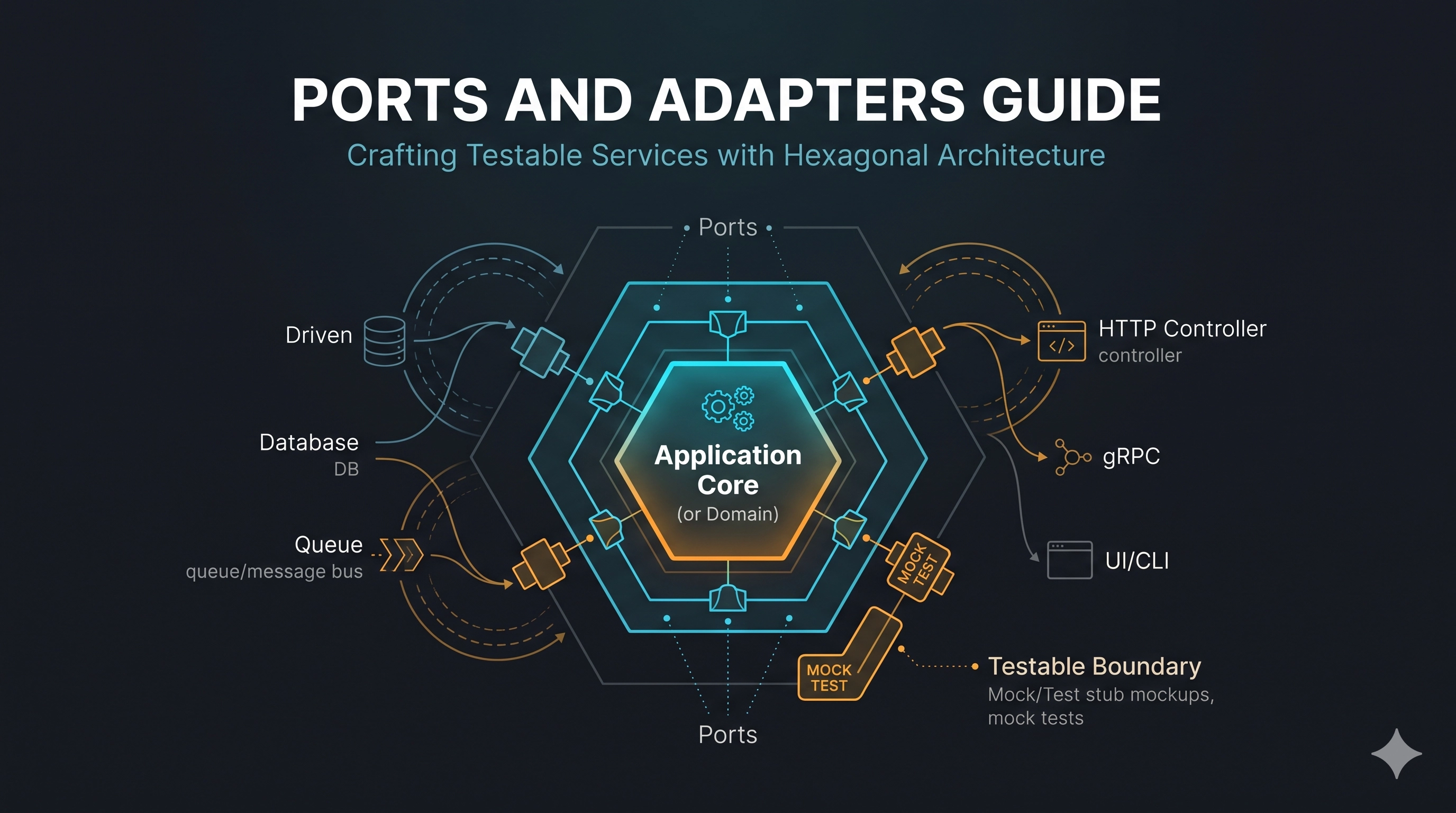
At its heart, Hexagonal Architecture advocates for isolating the application's core business logic from external technologies and infrastructure. Think of your application as a hexagon (hence the name), with its critical business rules residing at the center.
The edges of this hexagon are defined by Ports – technology-agnostic interfaces that declare what the application needs to interact with the outside world, and what the outside world needs to interact with the application. These ports are implemented by Adapters, which translate specific technologies (like a database, an HTTP framework, or a message queue) into a format that the application core understands, and vice-versa.
Core Concepts: Ports and Adapters
- Application Core / Domain Logic: This is the heart of your application. It contains all your business rules, entities, and services. Crucially, it has no knowledge of databases, web frameworks, or messaging systems. It only knows about its own domain objects and interfaces (ports).
- Ports: These are interfaces defined by the application core. They come in two main flavors:
- Driving Ports (Input Ports): Interfaces that define how external entities (e.g., a web UI, a REST API, a CLI) can interact with the application. An example might be
UserServicePortwith methods likecreateUser(data: CreateUserCommand). - Driven Ports (Output Ports): Interfaces that define what the application needs from external entities (e.g., a database, an external payment gateway). An example might be
UserRepositoryPortwith methods likesave(user: User): UserorfindById(id: string): User | undefined.
- Driving Ports (Input Ports): Interfaces that define how external entities (e.g., a web UI, a REST API, a CLI) can interact with the application. An example might be
- Adapters: These are concrete implementations of the ports, bridging the gap between the application core and external technologies.
- Driving Adapters: Implement driving ports. These are components like an HTTP controller, a GraphQL resolver, or a CLI command handler that receive input from users and translate it into calls to the application's driving ports.
- Driven Adapters: Implement driven ports. These are components like a
PostgreSQLUserRepository, anS3FileStorageAdapter, or aStripePaymentGatewayAdapter. They encapsulate the specific technology details and implement the interfaces defined by the application core.
The key principle is the Dependency Rule: dependencies flow inward. The application core depends only on its own interfaces (ports). Ports define the boundary, and adapters live outside, depending on the ports. This ensures your core business logic remains independent and highly testable.
A Practical Example: User Management Service (TypeScript)
Let's illustrate this with a simple user management service in TypeScript. We'll define a User entity, a UserService to manage users, and a UserRepositoryPort for persistence. We'll then create an in-memory adapter for testing and consider a PostgreSQL adapter for production.
1. The Domain and Driven Port
First, our core domain entity and the interface for how we'll persist users. Note that UserRepositoryPort is defined by the domain, not by a database driver.
// src/domain/user.ts
export interface User {
  id: string;
  name: string;
  email: string;
}

// src/domain/ports/user-repository.port.ts
export interface UserRepositoryPort {
  save(user: User): Promise<User>;
  findById(id: string): Promise<User | undefined>;
  findByEmail(email: string): Promise<User | undefined>;
}
2. The Application Core Service
This service contains our business logic for user creation and retrieval. It depends only on the UserRepositoryPort interface, making it completely independent of the actual persistence mechanism.
// src/application/user.service.ts
import { User } from '../domain/user';
import { UserRepositoryPort } from '../domain/ports/user-repository.port';

interface CreateUserCommand {
  name: string;
  email: string;
}

export class UserService {
  constructor(private readonly userRepository: UserRepositoryPort) {}

  async createUser(command: CreateUserCommand): Promise<User> {
    if (await this.userRepository.findByEmail(command.email)) {
      throw new Error('User with this email already exists.');
    }
    const newUser: User = {
      id: `user-${Date.now()}`,
      name: command.name,
      email: command.email,
    };
    return this.userRepository.save(newUser);
  }

  async getUserById(id: string): Promise<User | undefined> {
    return this.userRepository.findById(id);
  }

  async getUserByEmail(email: string): Promise<User | undefined> {
    return this.userRepository.findByEmail(email);
  }
}
3. A Driven Adapter (In-Memory for Testing)
This adapter implements the UserRepositoryPort using a simple in-memory map. Perfect for fast unit and integration tests without needing a real database.
// src/adapters/in-memory-user-repository.adapter.ts
import { User } from '../domain/user';
import { UserRepositoryPort } from '../domain/ports/user-repository.port';

export class InMemoryUserRepositoryAdapter implements UserRepositoryPort {
  private users: Map<string, User> = new Map();

  async save(user: User): Promise<User> {
    this.users.set(user.id, user);
    return { ...user }; // Return a clone to prevent external modification
  }

  async findById(id: string): Promise<User | undefined> {
    return this.users.get(id);
  }

  async findByEmail(email: string): Promise<User | undefined> {
    return Array.from(this.users.values()).find(user => user.email === email);
  }
}
4. Wiring It Up (Driving Adapter Example)
A driving adapter (like an HTTP controller) would interact with the UserService. Here's how you'd instantiate and use them, illustrating the dependency injection at the application's entry point.
// src/main.ts (simplified for illustration)
import { UserService } from './application/user.service';
import { InMemoryUserRepositoryAdapter } from './adapters/in-memory-user-repository.adapter';
// import { PostgresUserRepositoryAdapter } from './adapters/postgres-user-repository.adapter'; // Imagine this exists

async function bootstrapApplication() {
  // Choose your adapter based on environment or configuration
  const userRepository = new InMemoryUserRepositoryAdapter(); // For dev/test
  // const userRepository = new PostgresUserRepositoryAdapter(); // For production

  const userService = new UserService(userRepository);

  // Simulate a driving adapter (e.g., an incoming HTTP request)
  console.log('--- Creating User ---');
  const user1 = await userService.createUser({
    name: 'Alice Smith',
    email: 'alice@example.com',
  });
  console.log('Created user:', user1);

  console.log('--- Fetching User by ID ---');
  const fetchedUser = await userService.getUserById(user1.id);
  console.log('Fetched user:', fetchedUser);

  console.log('--- Attempting to create duplicate user (should fail) ---');
  try {
    await userService.createUser({
      name: 'Bob Johnson',
      email: 'alice@example.com',
    });
  } catch (error: any) {
    console.error('Error creating user:', error.message);
  }
}

bootstrapApplication();
Notice how main.ts is the only place explicitly aware of InMemoryUserRepositoryAdapter. The UserService itself knows nothing about it, only its port.
5. Testing the Core Logic
Testing the UserService becomes trivial. You can inject any implementation of UserRepositoryPort, most commonly a mock or the InMemoryUserRepositoryAdapter.
// src/application/user.service.test.ts (using a simple test runner like Jest/Vitest)
import { UserService } from './user.service';
import { InMemoryUserRepositoryAdapter } from '../adapters/in-memory-user-repository.adapter';
import { User } from '../domain/user';

describe('UserService', () => {
  let userService: UserService;
  let userRepository: InMemoryUserRepositoryAdapter; // Or a mock

  beforeEach(() => {
    userRepository = new InMemoryUserRepositoryAdapter();
    userService = new UserService(userRepository);
  });

  it('should create a new user', async () => {
    const user = await userService.createUser({
      name: 'Test User',
      email: 'test@example.com',
    });

    expect(user).toHaveProperty('id');
    expect(user.name).toBe('Test User');
    expect(user.email).toBe('test@example.com');

    const fetchedUser = await userService.getUserById(user.id);
    expect(fetchedUser).toEqual(user);
  });

  it('should not create a user with a duplicate email', async () => {
    await userService.createUser({
      name: 'Original User',
      email: 'duplicate@example.com',
    });

    await expect(
      userService.createUser({
        name: 'Another User',
        email: 'duplicate@example.com',
      })
    ).rejects.toThrow('User with this email already exists.');
  });

  it('should return undefined for a non-existent user', async () => {
    const user = await userService.getUserById('non-existent-id');
    expect(user).toBeUndefined();
  });
});
This shows how cleanly the business logic (UserService) can be tested in isolation, without needing to spin up a real database or external services.
Production Lessons & Trade-offs
While Hexagonal Architecture offers significant benefits, it's not a silver bullet. Understanding its trade-offs is crucial for successful adoption.
Benefits:
- High Testability: The primary advantage. Business logic can be unit tested quickly and reliably by injecting mock or in-memory adapters, drastically speeding up development cycles and increasing confidence.
- Technological Independence: You can swap out databases, message queues, or web frameworks with minimal impact on your core domain logic. This future-proofs your application against changing technology landscapes.
- Maintainability & Evolution: A clear separation of concerns makes the codebase easier to understand, maintain, and extend. Changes in infrastructure don't require changes in business rules, and vice-versa.
- Clean Architecture: Enforces a well-defined boundary between core logic and infrastructure, leading to a more organized and understandable codebase.
Challenges & Trade-offs:
- Initial Boilerplate: Defining interfaces (ports) and separate adapter implementations can feel like extra work, especially for very simple applications.
- Conceptual Overhead: New team members might need time to grasp the concepts of ports, adapters, and dependency inversion.
- Increased Complexity for Simple CRUD: For truly trivial CRUD applications, the architectural overhead might outweigh the benefits. Consider the complexity of your domain before applying it rigorously.
- Configuration Management: Managing which adapters to inject (e.g., development vs. production database adapter) requires a robust dependency injection setup.
Hexagonal Architecture shines in applications with complex, evolving business logic and a desire for long-term maintainability and flexibility. For simple microservices that are essentially thin wrappers around a database, a simpler layered architecture might suffice. However, as business rules grow, the investment in ports and adapters pays dividends.
Key Takeaways
- Isolate Business Logic: Hexagonal Architecture keeps your core domain independent of external technologies.
- Ports Define Boundaries: Interfaces (ports) are owned by the domain and define how it interacts with the outside world.
- Adapters Implement Ports: Adapters bridge the gap between ports and specific technologies (e.g., databases, web frameworks).
- Enhances Testability: Enables easy unit testing of core logic by swapping adapters with mocks or in-memory implementations.
- Promotes Flexibility: Allows you to change underlying infrastructure with minimal impact on business rules.
Be the first to leave a comment.
Leave a comment